2021년 3월 2일 화요일

Asuswrt Merlin dnsmasq 를 이용하여 시간대별 youtube lol 차단

우선 /jffs/scripts 를 사용할수 있게 config에서 설정

Support for these scripts stored under /jffs/scripts/ must be enabled, under Administration -> System on the webui:


아래 등록 스크립트 작성
cat /jffs/scripts/add.sh
#!/bin/sh
echo "address=/youtube.com/127.0.0.1"  > /jffs/configs/dnsmasq.conf.add
echo "address=/prod.kr.lol.riotgames.com/127.0.0.1" >> /jffs/configs/dnsmasq.conf.add
service restart_dnsmasq


아래 삭제 스크립트 작성

cat /jffs/scripts/del.sh

#!/bin/sh

echo "" > /jffs/configs/dnsmasq.conf.add
service restart_dnsmasq

실행 권한 주기
chmod 755  /jffs/scripts/add.sh
chmod 755  /jffs/scripts/del.sh

크론탭에 등록하기
예제는 24:00 에 차단 07:00 에 차단해제

cru a add_dnsmasq "0 0 * * * /jffs/scripts/add.sh"
cru a del_dnsmasq "0 7 * * * /jffs/scripts/del.sh"

참고 
크론탭 등록 방법
https://www.cyberciti.biz/faq/how-to-add-cron-job-on-asuswrt-merlin-wifi-router/
커스텀 dnsmasq 사용 방법
https://github.com/RMerl/asuswrt-merlin.ng/wiki/Custom-domains-with-dnsmasq


2021년 1월 17일 일요일

android app 에서 32bit , 64bit 선택 설치

 2019 년 8월 1일부터 Google Play에 게시되는 앱은 64bit 아키텍처를 지원해야 합니다.

그런데 64bit app 에서 일부 불안정하여 32bit app 을 필요로 할때가 있습니다.

디폴트로 아키텍처가 64bit면 64bit 모드로만 설치가 됩니다.

아래와 같이 adb를 --abi 옵션을 이용하여 선택적으로 설치가 가능합니다.

지원되는 abi 자세한 설명에 대해선 아래 사이트를 참조 합니다.

https://developer.android.com/ndk/guides/abis?hl=ko


아래는 인텔 아키텍처 32bit 전용으로 설치할 경우 입니다. 

32bit 인텔 아키텍처는 x86 입니다. 

adb install --abi x86 example.apk

4652 KB/s (35631753 bytes in 7.479s)

        pkg: /data/local/tmp/example.apk

Failure [INSTALL_FAILED_NO_MATCHING_ABIS]

위와같이 32bit 를 지원하지 않는 app 경우에 INSTALL_FAILED_NO_MATCHING_ABIS 에러가 납니다. 

adb install --abi x86 example.apk

4012 KB/s (83017609 bytes in 20.207s)

        pkg: /data/local/tmp/example.apk

Failure [INSTALL_FAILED_ALREADY_EXISTS]

이미 앱이 설치가 되어있는 경우에 위와 같이 INSTALL_FAILED_ALREADY_EXISTS 설치가 미리 되었다는 에러가 나는데 그럴땐 재설치 옵션 -r 를 사용합니다.

adb install -r --abi x86 example.apk

4330 KB/s (83017609 bytes in 18.720s)

        pkg: /data/local/tmp/example.apk

Success


2021년 1월 7일 목요일

2021년 1월 6일 수요일

Linux 커널 업그레이드후 vmware 모듈 문제

 Linux 커널 업그레이드 후 vmware 재실행시 모듈이 설치 되지 않았다고 다시 나온다 새 커널 버전에 맞게 모듈을 재 빌드 해야 하며 아래 명령어로 재빌드한다

vmware-modconfig --console --install-all

2020년 7월 28일 화요일

윈도우 한영 전환 레지스트리 모음

101Key_Type3


Windows Registry Editor Version 5.00

[HKEY_LOCAL_MACHINE\SYSTEM\CurrentControlSet\Services\i8042prt\Parameters]
"LayerDriver KOR"="KBD101C.DLL"
"OverrideKeyboardIdentifier"="PCAT_101CKEY"
"OverrideKeyboardType"=dword:00000008
"OverrideKeyboardSubtype"=dword:00000005
"LayerDriver JPN"="kbd101.dll"


Shift + Space 전환

Windows Registry Editor Version 5.00

[HKEY_LOCAL_MACHINE\SYSTEM\CurrentControlSet\Services\i8042prt\Parameters]
"PollingIterations"=dword:00002ee0
"PollingIterationsMaximum"=dword:00002ee0
"ResendIterations"=dword:00000003
"LayerDriver JPN"="kbd101.dll"
"LayerDriver KOR"="kbd101c.dll"
"OverrideKeyboardType"=dword:00000008
"OverrideKeyboardSubtype"=dword:00000005
"OverrideKeyboardIdentifier"="kbd101c.dll"
"KeyboardFailedReset"=dword:00000000

[HKEY_LOCAL_MACHINE\SYSTEM\CurrentControlSet\Control\Keyboard Layout]
"Scancode Map"=hex:00,00,00,00,\
                   00,00,00,00,\ 
                   03,00,00,00,\
                   72,00,38,E0,\ 
                   71,00,1D,E0,\
                   00,00,00,00


2020년 4월 13일 월요일

rclone systemd 방식으로 마운트


https://forum.rclone.org/t/rclone-auto-mount/6353/14 에서 참고 했습니다.

# vi /etc/systemd/system/rclonemount.service

[Unit]
Description=RClone Service
After=network-online.target
Wants=network-online.target


[Service]
Type=notify
ExecStart=/usr/bin/rclone mount --allow-other --vfs-read-chunk-size 16M --buffer-size 2G onedrive: /mnt/onedrive
ExecStop=/bin/fusermount -uz /mnt/onedrive
Restart=on-abort
User=users
Group=users

[Install]
WantedBy=default.target


# systemctl daemon-reload
# systemctl enable rclonemount
# systemctl start rclonemount

2020년 4월 4일 토요일

vmware guest 에서 ubuntu / debian 계열 사운드 소리가 작을때

vmware guest 에서 ubuntu / debian 계열 사운드 소리가 작을때

vmware 에서 내장사운드로 Ensoniq AudioPCI  계열로 잡히는데 소리가 매우 작습니다.
Windows 계열은 정상적으로 소리가 나네요

AlsaMixer 를 이용해서 PCM 부분 볼륨을 방향키로 이동해서 높혀주면됩니다.
나올때는 ESC 키 입니다.

명령어는 alsamixer 입니다.


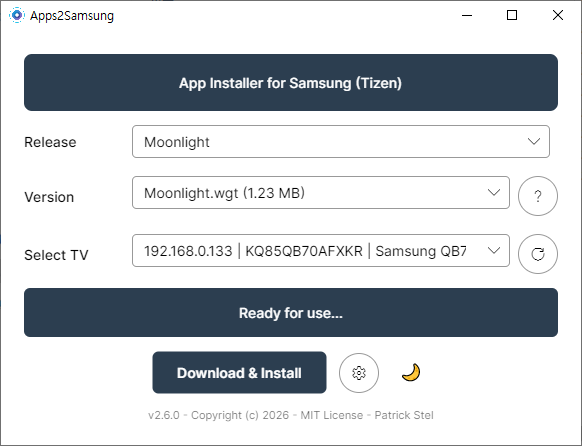
Stream Your PC Games to a Samsung TV — Sunshine + Moonlight Setup Guide (Free GeForce Now Alternative)

Stream Your PC Games to a Samsung TV — Sunshine + Moonlight Cloud gaming like GeForce Now costs a monthly subscription. But what if you u...