iterm2 메뉴에서 Preferences => Keys 로 가서 아래 첨부파일 그림 참조하여 추가
I like to take notes on travel, and I am putting together various IT tips that I often forget during work.
2021년 1월 7일 목요일
2021년 1월 6일 수요일
Linux 커널 업그레이드후 vmware 모듈 문제
Linux 커널 업그레이드 후 vmware 재실행시 모듈이 설치 되지 않았다고 다시 나온다 새 커널 버전에 맞게 모듈을 재 빌드 해야 하며 아래 명령어로 재빌드한다
vmware-modconfig --console --install-all
2020년 7월 28일 화요일
윈도우 한영 전환 레지스트리 모음
101Key_Type3
Windows Registry Editor Version 5.00
[HKEY_LOCAL_MACHINE\SYSTEM\CurrentControlSet\Services\i8042prt\Parameters]
"LayerDriver KOR"="KBD101C.DLL"
"OverrideKeyboardIdentifier"="PCAT_101CKEY"
"OverrideKeyboardType"=dword:00000008
"OverrideKeyboardSubtype"=dword:00000005
"LayerDriver JPN"="kbd101.dll"
Windows Registry Editor Version 5.00
[HKEY_LOCAL_MACHINE\SYSTEM\CurrentControlSet\Services\i8042prt\Parameters]
"LayerDriver KOR"="KBD101C.DLL"
"OverrideKeyboardIdentifier"="PCAT_101CKEY"
"OverrideKeyboardType"=dword:00000008
"OverrideKeyboardSubtype"=dword:00000005
"LayerDriver JPN"="kbd101.dll"
Shift + Space 전환
Windows Registry Editor Version 5.00
[HKEY_LOCAL_MACHINE\SYSTEM\CurrentControlSet\Services\i8042prt\Parameters]
"PollingIterations"=dword:00002ee0
"PollingIterationsMaximum"=dword:00002ee0
"ResendIterations"=dword:00000003
"LayerDriver JPN"="kbd101.dll"
"LayerDriver KOR"="kbd101c.dll"
"OverrideKeyboardType"=dword:00000008
"OverrideKeyboardSubtype"=dword:00000005
"OverrideKeyboardIdentifier"="kbd101c.dll"
"KeyboardFailedReset"=dword:00000000
[HKEY_LOCAL_MACHINE\SYSTEM\CurrentControlSet\Control\Keyboard Layout]
"Scancode Map"=hex:00,00,00,00,\
00,00,00,00,\
03,00,00,00,\
72,00,38,E0,\
71,00,1D,E0,\
00,00,00,00
2020년 4월 13일 월요일
rclone systemd 방식으로 마운트
https://forum.rclone.org/t/rclone-auto-mount/6353/14 에서 참고 했습니다.
# vi /etc/systemd/system/rclonemount.service
[Unit]
Description=RClone Service
After=network-online.target
Wants=network-online.target
[Service]
Type=notify
ExecStart=/usr/bin/rclone mount --allow-other --vfs-read-chunk-size 16M --buffer-size 2G onedrive: /mnt/onedrive
ExecStop=/bin/fusermount -uz /mnt/onedrive
Restart=on-abort
User=users
Group=users
[Install]
WantedBy=default.target
# systemctl daemon-reload
# systemctl enable rclonemount
# systemctl start rclonemount
2020년 4월 4일 토요일
vmware guest 에서 ubuntu / debian 계열 사운드 소리가 작을때
vmware 에서 내장사운드로 Ensoniq AudioPCI 계열로 잡히는데 소리가 매우 작습니다.
Windows 계열은 정상적으로 소리가 나네요
AlsaMixer 를 이용해서 PCM 부분 볼륨을 방향키로 이동해서 높혀주면됩니다.
나올때는 ESC 키 입니다.
명령어는 alsamixer 입니다.
vmware 에서 내장사운드로 Ensoniq AudioPCI 계열로 잡히는데 소리가 매우 작습니다.
Windows 계열은 정상적으로 소리가 나네요
AlsaMixer 를 이용해서 PCM 부분 볼륨을 방향키로 이동해서 높혀주면됩니다.
나올때는 ESC 키 입니다.
명령어는 alsamixer 입니다.
2020년 3월 15일 일요일
ubuntu 데스크탑을 Windows 원격 데스크톱 으로 접속하기
sudo apt install xrdp
그렇지만 Windows 원격 데스크톱으로 로그온 하면
"색상 프로파일을 만들려면 인증이 필요합니다"
메시지가 무한 반복된다.
아래와 같이 권한을 넣어준후 xrdp 데몬 재시작 하면 해결됨
vi /etc/polkit-1/localauthority/50-local.d/45-allow-colord.pkla
[Allow Colord all Users]
Identity=unix-user:*
Action=org.freedesktop.color-manager.create-device;org.freedesktop.color-manager.create-profile;org.freedesktop.color-manager.delete-device;org.freedesktop.color-manager.delete-profile;org.freedesktop.color-manager.modify-device;org.freedesktop.color-manager.modify-profile
ResultAny=no
ResultInactive=no
ResultActive=yes
ubuntu server 데스크탑 환경 및 한글화
한글화를 위해 우선 로케일 설정
sudo apt install language-pack-ko
sudo locale-gen ko_KR.UTF-8
아래명령에서 ko_KR.UTF-8 설치후 선택
sudo dpkg-reconfigure locales
기본 명령 및 메시지까지 한글로 나오게 합
sudo update-locale LANG=ko_KR.UTF-8 LC_MESSAGES=ko_KR.UTF-8
이후 데스크탑 패키지 설치
sudo apt install ubuntu-desktop
sudo apt install ubuntu-gnome-desktop
sudo apt install language-pack-ko
sudo locale-gen ko_KR.UTF-8
아래명령에서 ko_KR.UTF-8 설치후 선택
sudo dpkg-reconfigure locales
기본 명령 및 메시지까지 한글로 나오게 합
sudo update-locale LANG=ko_KR.UTF-8 LC_MESSAGES=ko_KR.UTF-8
또는
vi /etc/default/locale
LANG="ko_KR.UTF-8"
LC_MESSAGES=ko_KR.UTF-8
LANGUAGE="ko:en"
LC_NUMERIC="ko_KR.UTF-8"
LC_TIME="ko_KR.UTF-8"
LC_MONETARY="ko_KR.UTF-8"
LC_PAPER="ko_KR.UTF-8"
LC_IDENTIFICATION="ko_KR.UTF-8"
LC_NAME="ko_KR.UTF-8"
LC_ADDRESS="ko_KR.UTF-8"
LC_TELEPHONE="ko_KR.UTF-8"
LC_MEASUREMENT="ko_KR.UTF-8"
이후 데스크탑 패키지 설치
sudo apt install ubuntu-desktop
sudo apt install ubuntu-gnome-desktop
데스크탑 로그온 후 부족한 한글 메시지 관련 패키지 추가 설치
피드 구독하기:
글 (Atom)
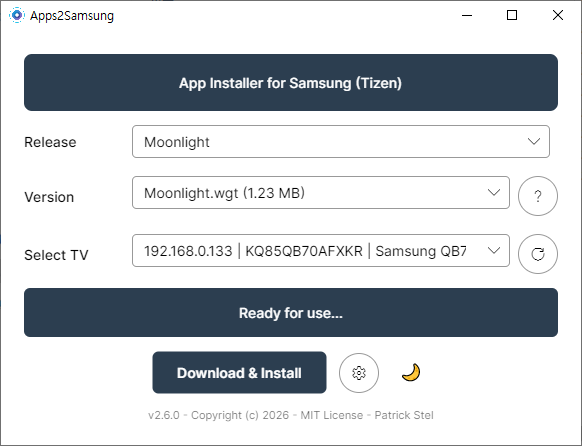
Stream Your PC Games to a Samsung TV — Sunshine + Moonlight Setup Guide (Free GeForce Now Alternative)
Stream Your PC Games to a Samsung TV — Sunshine + Moonlight Cloud gaming like GeForce Now costs a monthly subscription. But what if you u...
-
마우이 북쪽에 카팔루아 비치라고 유명한 스노우 쿨링 장소가 있습니다. 주차장은 카팔루아 비치를 따라 트레일 코스가 있는데 비치 이용자 및 트레일러를 위한 무료 주차장이 있습니다. 아침 9시 이전에 가면 주차장이 널널 합니다. 주차장은 점심 시간대...
-
빅아일랜드 코나 지역에서 힐튼 와이콜리아 빌리지 호텔에 묵었지만 호텔에 딸려있는 레스토랑은 줄도 길고 너무 비싸고 맛도 없다는것을 금방 알게 됩니다. 특히 팁 세금 까지 합하면 아이들과 도니 &토니스 피자에서 피자 한판 먹는데 7만원이 ...
-
Want to install Jellyfin on a Samsung Tizen TV? Start with the Samsung Apps store. Jellyfin now has an official Tizen client, but store ava...