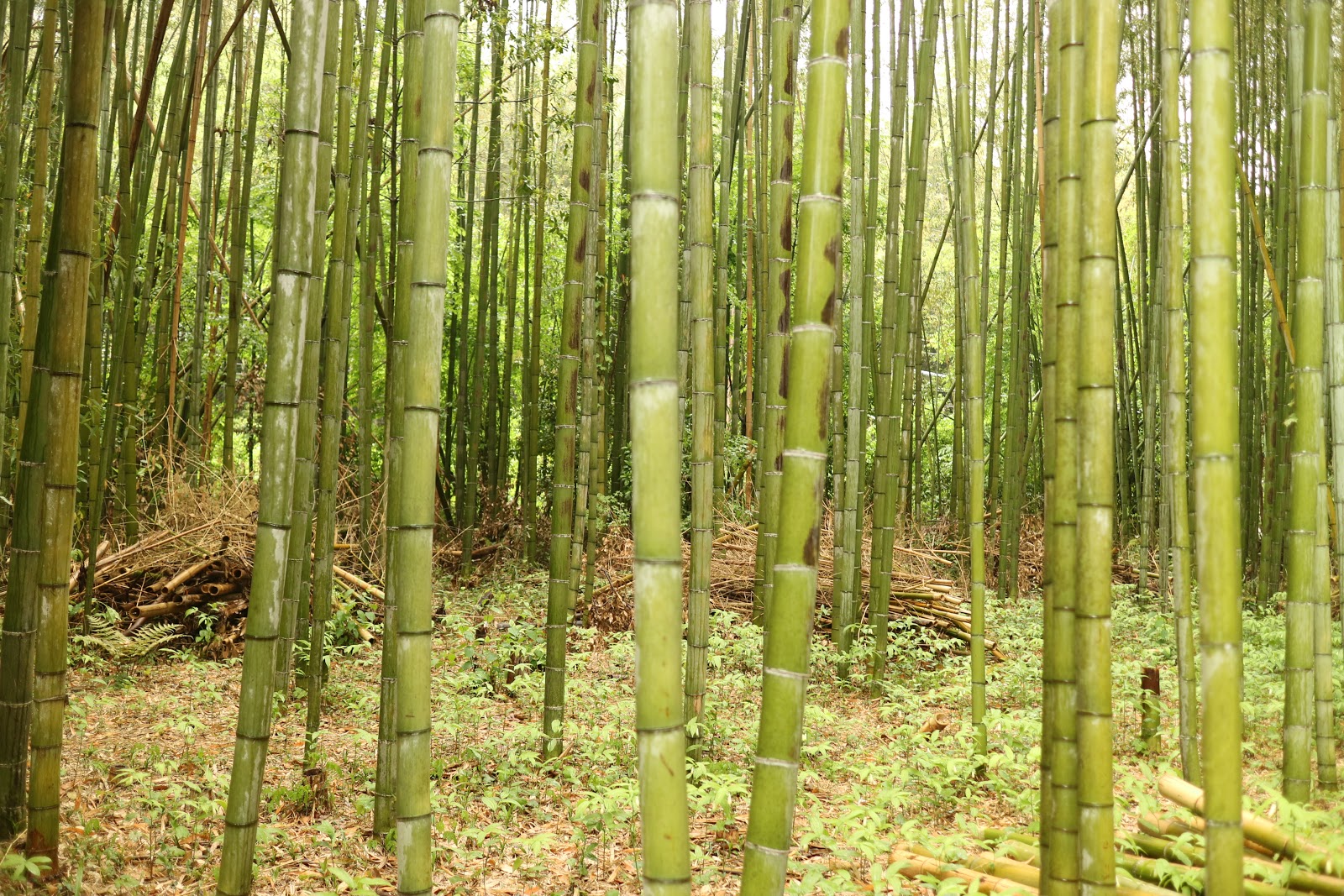
교토의 아라시야마 는 교토의 대표적인 관광지라고 하네요.
봄에는 벛꽃, 가을에는 단풍명소로 유명하다고 합니다.
교토 아라시야마에는 엄청난 대나무 숲이 있는데 이숲으로 가기전 천년의 역사를 가진 도케츠교를 보게 됩니다.
이 다리를 연인이 건널때 뒤를 돌아보면 헤여진다는 소문이 있더군요. 연인사이는 다리를 건너면서 뒤 돌아 보시지 마시길...
저는 시간관계상 멀리서 사진만 찍었습니다.
아라시야마 대나무 숲으로 가는길에 많은 음식점, 디저트가게, 많은 기념품 가게등을 만납니다. 사람이 무척 많습니다.
대나무 숲에 들어오면 정말 울창한 대나무 숲이 끝도 없이 펼쳐집니다.
많은 CF 장소로 유명하다고 하네요.
안에 아담한 규모의 산사도 있는데 입장료를 받나 봅니다. 밖에서만 사진으로
인력거 관광도 있나 봅니다.
비가 오는데도 엄청난 인파와 함께 돌아다녔어요. 저는 오전에 갔는데 오후에는 사람이 더 많다고 합니다.
I like to take notes on travel, and I am putting together various IT tips that I often forget during work.
2018년 5월 8일 화요일
2018년 5월 7일 월요일
교토 - 아마노하시다테 전망대
아마노하시다테는 교토 미야즈 시에 있는 일본 3대 절경중 하나라고 하네요.
석호라고 합니다.
우선 석호 및 자연발생된 다리를 보기 위해서 한눈에 보기 위해서 전망대 케이블카를 탑승합니다. 비가 많이 왔어요.
매표소에서 사도 되고 자판기에서 뽑아도 되고.
케이블카 또는 1인용 리프트를 타고 올라갈수 있는데. 제가 갔을때는 비가 많이 와서 리프트는 운행하지 않았습니다.
케이블카를 탑승시
1인용 리프트를 탈시 (우천 관계로 운행을 하지 않았습니다.)
올라갈때 케이블카를 타고 내려올때 리프트를 타고 그 반대로도 가능 하답니다.
자동매표소 이고, 옆에 매표소에서도 살 수 있습니다.
티켓은 아래와 같이 생겼어요. 내려올때 잘 보관 해야 됩니다. 잃어버리면 내려올때 사야 할수 있으니.
종합 안내도 입니다.
우천 관계로 케이블카를 타고 올라갑니다.
케이블 카 안에는 아래와 같이 생겼습니다.
줄로 잡아 당기는지 올라가는 절경. 중간에 올라가고 내려오는 케이블 카가 만나는 접점이 있습니다.
석호라고 합니다.
우선 석호 및 자연발생된 다리를 보기 위해서 한눈에 보기 위해서 전망대 케이블카를 탑승합니다. 비가 많이 왔어요.
매표소에서 사도 되고 자판기에서 뽑아도 되고.
케이블카 또는 1인용 리프트를 타고 올라갈수 있는데. 제가 갔을때는 비가 많이 와서 리프트는 운행하지 않았습니다.
케이블카를 탑승시
1인용 리프트를 탈시 (우천 관계로 운행을 하지 않았습니다.)
올라갈때 케이블카를 타고 내려올때 리프트를 타고 그 반대로도 가능 하답니다.
자동매표소 이고, 옆에 매표소에서도 살 수 있습니다.
티켓은 아래와 같이 생겼어요. 내려올때 잘 보관 해야 됩니다. 잃어버리면 내려올때 사야 할수 있으니.
종합 안내도 입니다.
우천 관계로 케이블카를 타고 올라갑니다.
케이블 카 안에는 아래와 같이 생겼습니다.
줄로 잡아 당기는지 올라가는 절경. 중간에 올라가고 내려오는 케이블 카가 만나는 접점이 있습니다.
다 올라왔습니다.
석호와 자연으로 생긴 길이 보입니다. 거꾸로 보면 하늘로 승천하는 것처럼 길이 보인다고 하네요.
아찔한 유리 바닥도 있네요.
꼭 대기엔 기념품 샾도 있습니다.
2018년 4월 29일 일요일
Kobe 고베 차이나 타운
고베항 근처에 몇블럭 걸어오면 차이나 타운이 있습니다.
고베 차이나 타운은 일본의 4대 차이나 타운 중에 하나라고 합니다.
(일본의 4대 차이나 타운은 고베, 도쿄, 나가사키, 요코하마에 있습니다.)
고베항 개항때 중국에서 일본으로 건너온 중국인들은 고베항에서 가까운 이 장소에 거처를 두어, 음식이나 잡화점 등의 장사를 시작하게 된것으로 알고 있습니다.
차이나 타운 답게 붉은색으로 도배가 되어있네요.
입구를 상징하는 문입니다. 문이 동쪽 서쪽등 여러개 있는것 같습니다.
입구로 들어서면 차이나 타운에 맞게 붉은색으로 도배된 간판과 각종 중국 음식점들이 있습니다.
중심부 같습니다.
이 중심부 앞에 유명한 만두집이 있다고 합니다. 만두를 사기 위한 긴 줄이 이어 지네요
긴 줄을 서서 만두를 샀습니다. 일본인들 맛에는 맛있는지 모르겠으나 제 입맛에는 맛은 그닥 없습니다.
고베 차이나 타운은 일본의 4대 차이나 타운 중에 하나라고 합니다.
(일본의 4대 차이나 타운은 고베, 도쿄, 나가사키, 요코하마에 있습니다.)
고베항 개항때 중국에서 일본으로 건너온 중국인들은 고베항에서 가까운 이 장소에 거처를 두어, 음식이나 잡화점 등의 장사를 시작하게 된것으로 알고 있습니다.
차이나 타운 답게 붉은색으로 도배가 되어있네요.
입구를 상징하는 문입니다. 문이 동쪽 서쪽등 여러개 있는것 같습니다.
입구로 들어서면 차이나 타운에 맞게 붉은색으로 도배된 간판과 각종 중국 음식점들이 있습니다.
중심부 같습니다.
이 중심부 앞에 유명한 만두집이 있다고 합니다. 만두를 사기 위한 긴 줄이 이어 지네요
긴 줄을 서서 만두를 샀습니다. 일본인들 맛에는 맛있는지 모르겠으나 제 입맛에는 맛은 그닥 없습니다.
Kobe 고베 메리켄파크
고베항을 대표하는 메리켄파크를 들려보았습니다.
처음에 보이는 모자이크 라는 곳이네요. 건물이 이쁘고 각종 음식점과 기념품을 파는곳이 있습니다.
모자이크 쪽에서 보이는 빨간 기둥은 고베 포트 타워로 알려져있으며 원래는 항구의 등대라고 합니다.
MOSAIC 길은 이쁘네요
아이들 실내 놀이터 인가봅니다.
근처에 MOSAIC BIG FERRIS WHEEL 도 있고요, 오전10~오후10시까지 하나봅니다.
각종 이쁜 레스토랑들이 많습니다.
고베 포트 타워쪽으로 걸어오면 이곳 항구에 1995년 고베 대지진의 희생자를 추모하는 고베항지진 메모리얼 파크가 있습니다.
새벽 5시 47분에 지진이 일어나서 약 4만명정도 죽었다고 합니다. 만약 1시간정도만 지진이 늦게 일어났어도 출근시간이 겹쳐서 길에서 40만명이 넘었을것이라고 합니다.
이곳을 추모하고자 지진 당시 폐허가된 부두의 일부를 그대로 보존하고 있습니다.
처음에 보이는 모자이크 라는 곳이네요. 건물이 이쁘고 각종 음식점과 기념품을 파는곳이 있습니다.
모자이크 쪽에서 보이는 빨간 기둥은 고베 포트 타워로 알려져있으며 원래는 항구의 등대라고 합니다.
MOSAIC 길은 이쁘네요
아이들 실내 놀이터 인가봅니다.
근처에 MOSAIC BIG FERRIS WHEEL 도 있고요, 오전10~오후10시까지 하나봅니다.
각종 이쁜 레스토랑들이 많습니다.
고베 포트 타워쪽으로 걸어오면 이곳 항구에 1995년 고베 대지진의 희생자를 추모하는 고베항지진 메모리얼 파크가 있습니다.
새벽 5시 47분에 지진이 일어나서 약 4만명정도 죽었다고 합니다. 만약 1시간정도만 지진이 늦게 일어났어도 출근시간이 겹쳐서 길에서 40만명이 넘었을것이라고 합니다.
이곳을 추모하고자 지진 당시 폐허가된 부두의 일부를 그대로 보존하고 있습니다.
2018년 4월 18일 수요일
Check certificates with openssl or curl (check expiration period)
When checking various things such as certificates with curl, you can simply use the following command.
$ curl --insecure -v https://www.google.com
You can simply check the certificate status and check the expiration with the openssl command.
The openssl's s_client option has many features. -connect Dumps certificate status with a simple function.
$ openssl s_client -connect localhost: 443
Let's check the certificate of google.com by openssl as below.
$ echo | openssl s_client -connect www.google.com:443 2> / dev / null | openssl x509 -noout -dates
notBefore = Nov 29 09:47:51 2017 GMT
notAfter = Feb 21 09:37:00 2018 GMT
$ echo | openssl s_client -connect www.google.com:443 2> / dev / null | openssl x509 -noout -enddate
notAfter = Feb 21 09:37:00 2018 GMT
You can see the status of the certificate simply by using the command below:
$ openssl x509 -in ./your.crt -noout -text | more
$ openssl x509 -in ./your.crt -noout -dates
If you are using the s_client option, you can dump or extract certificates as shown below:
$ openssl s_client -connect www.google.com:443> cert
depth = 2 C = US, O = GeoTrust Inc., CN = GeoTrust Global
verify error: num = 20: unable to get local issuer certificate
verify return: 0
Typing quit in the above state will save it to the cert file.
Save the certificate as PEM with the following command
$ openssl x509 -inform PEM -in cert -text -out cert.crt
The stored PEM type certificate can be checked as below:
$ openssl x509 -in cert.crt -noout -text
$ curl --insecure -v https://www.google.com
You can simply check the certificate status and check the expiration with the openssl command.
The openssl's s_client option has many features. -connect Dumps certificate status with a simple function.
$ openssl s_client -connect localhost: 443
Let's check the certificate of google.com by openssl as below.
$ echo | openssl s_client -connect www.google.com:443 2> / dev / null | openssl x509 -noout -dates
notBefore = Nov 29 09:47:51 2017 GMT
notAfter = Feb 21 09:37:00 2018 GMT
$ echo | openssl s_client -connect www.google.com:443 2> / dev / null | openssl x509 -noout -enddate
notAfter = Feb 21 09:37:00 2018 GMT
You can see the status of the certificate simply by using the command below:
$ openssl x509 -in ./your.crt -noout -text | more
$ openssl x509 -in ./your.crt -noout -dates
If you are using the s_client option, you can dump or extract certificates as shown below:
$ openssl s_client -connect www.google.com:443> cert
depth = 2 C = US, O = GeoTrust Inc., CN = GeoTrust Global
verify error: num = 20: unable to get local issuer certificate
verify return: 0
Typing quit in the above state will save it to the cert file.
Save the certificate as PEM with the following command
$ openssl x509 -inform PEM -in cert -text -out cert.crt
The stored PEM type certificate can be checked as below:
$ openssl x509 -in cert.crt -noout -text
2018년 4월 8일 일요일
Support for applications not supported by Samsung DeX with DeX Max
Samsung DeX has been around for a long time, but there are a lot of applications that do not support it.
Especially some video players, kodi and Microsoft Remote Desktop apps do not support full screen mode in DeX, which makes them very frustrating.
At the end of the search, I found an application called Dex Max.
This is an app that supports converting applications that do not support DeX.
It is very useful.
When you run Microsoft Remote Desktop in DeX mode, You will not be able to extension the screen or extension to full screen
Basic screen
Landscape mode is supported in Dex, but the screen can not be extended.
Install the Dex Max app and try converting your app. Even if you do not convert apps, some apps will grow and shrink screen when run in Dex Max.
However, Microsoft Remote Desktop could not display the full screen of the remote window connected to it.
Dex Max is available for download from the Play Store below.
https://play.google.com/store/apps/details?id=xyz.masmas.dexmax
Especially some video players, kodi and Microsoft Remote Desktop apps do not support full screen mode in DeX, which makes them very frustrating.
At the end of the search, I found an application called Dex Max.
This is an app that supports converting applications that do not support DeX.
It is very useful.
When you run Microsoft Remote Desktop in DeX mode, You will not be able to extension the screen or extension to full screen
Basic screen
Landscape mode is supported in Dex, but the screen can not be extended.
Install the Dex Max app and try converting your app. Even if you do not convert apps, some apps will grow and shrink screen when run in Dex Max.
However, Microsoft Remote Desktop could not display the full screen of the remote window connected to it.
To fully extend the fullscreen to the remote window connected to it, go to the Dex Max Expert tab and do full app conversion.
If you select an app you want to convert, you will convert it as shown below.
If this happens, you should delete the original app and reinstall it with the converted app.
Due to Android security, you have to grant permission for unknown apps.
After converting Microsoft Remote Desktop reinstalling it, you can do full screen as below.
In Microsoft Remote Desktop, you can get the maximum resolution associated with DeX by setting resolution to Match this device in Edit customize display resolution for each saved session. (See figure below)
Below youtube is an example of a Dex Max app to convert kodi to fullscreen.
Dex Max is available for download from the Play Store below.
https://play.google.com/store/apps/details?id=xyz.masmas.dexmax
피드 구독하기:
글 (Atom)